All enrolments must follow the same procedure
regardless of whether it is your first time or not.
1. Fill out the enrolment form.
Download the enrolment form. Go to the Course Timetable page and click on the form for your region.
Print off the form, fill it out and then send it back by fax, post or email. If you have a Mac, you can fill out the form on the computer and send it directly without having to print it off.
2. Attach deposit
A payment of 25% deposit or more is required with the enrolment form. If you cannot afford to pay the balance at the start of the course, please do not sign up.
No deposit – no enrolment
The balance of the fees is due on the first day of the course.
3. Conditions of Enrolment Acceptance
It is important that you understand that it is not our responsibility to make up for sessions that you may miss in any given course. If you enrol, you are agreeing to attend the timetabled sessions and releasing Airbrush Venturi from any responsibility. Please sign the conditions
In the event that you have to miss a session, we can support you, but in the event that two session are missed, you will be removed from the course and placed in the next course starting.
4. Enrolment processing & acceptance
Once your enrolment form has been received and processed, an automatically generated email will be sent to you confirming your place in the course. If you do not receive your confirmation email within 7 days, please ring 1300 247 278.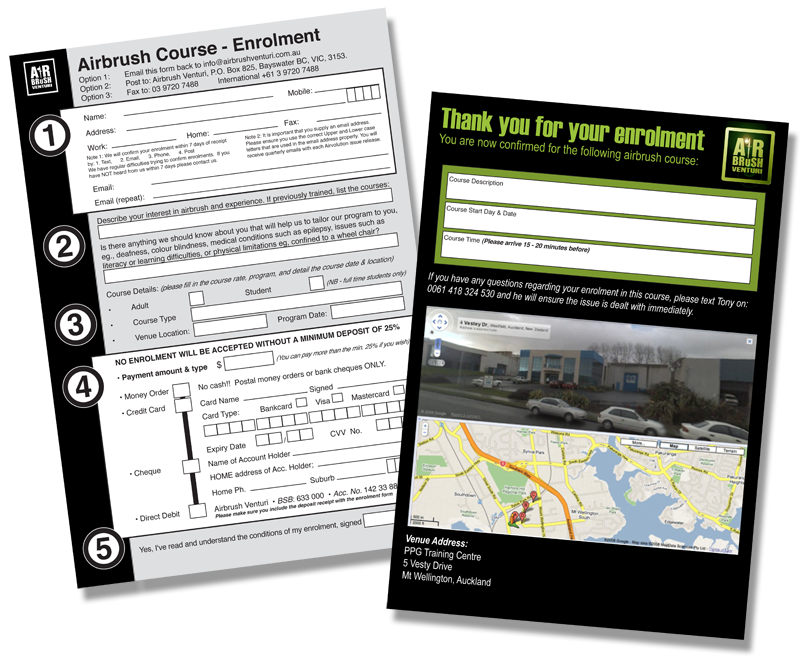
The Complaints Process:
If at any time you have any problems with your training it is important that you talk to us. Every organisation can make mistakes but it is how that organisation responds to the error that reveals it’s inner qualities. But we cannot help you if you do not talk to us.
You have the choice of handling the issue at an “informal” level by simply talking to any of the team at the two different levels listed below, or at a “formal” level by making your complaint in writing.
There are three levels of people in Airbrush Venturi that you can talk to:
1. The Teacher
2. The Head Office Manager
The Appeals Process:
In the event that a student is not satisfied with a decision that is made by the teacher, the student may appeal the decision by requesting a review by the regional manager and in the event that the matter is not completely resolved it will be reviewed by the national lead assessor, Symon Molony.
If at any time you feel that a problem has become serious, please immediately contact Mrs Bridget Vowles on the below details:
• Telephone:
Australia: 1300 247 278 (1300 AIRBRUSH)
New Zealand : +61 439 809 104
• Email: enrolments@airbrushventuri.com.au
Students may also gain access to their student records at any time by contacting head office on 1300 247 278 (1300 AIRBRUSH).
